

Betovis App and Mobile Version
Browser, home-screen shortcut (PWA) and Android APK side by side, with setup steps, safety checks and troubleshooting.
18+ · Gamble responsibly
Looking for the Betovis app normally begins in a store and ends in confusion, because the platform is absent from Google Play and the App Store. A phone offers three genuine routes: the mobile browser, a home-screen shortcut called a PWA, and an APK file for Android. The guide explains what each does, how to set it up and what risk it carries, so the decision is made calmly instead of by whichever link shows up first.
The page is written for adults of 18 and over. Menu labels differ by phone maker and system version, so pick the closest match when your screen looks different. If play stops being enjoyable, national helplines such as GamCare give free and confidential support. Last reviewed: 12 November 2026.
Betovis Mobile Version Overview
Most people need no extra app, whether the handset is a Betovis Android phone or a Betovis iOS one. The site is designed for small screens, so the sportsbook, cashier, live streams and game lists open normally in a mobile browser. Account, balance and bet history are the same on every device; a bet placed on a phone also appears on a laptop. What changes is the layout, with the menu moving to a bar at the bottom.
One rule settles the choice: the less you install, the smaller the risk. A browser installs nothing, a PWA adds just a shortcut and an APK places a file on the phone. A sensible order is browser first, PWA second, APK only when there is a clear reason.
- Occasional users: the browser is enough.
- Everyday players: a home-screen shortcut saves time.
- Android owners who want full screen and notifications might consider the APK.
- iPhone owners get one extra route, the PWA.
Alerts behave differently by route: a browser shows none, a PWA can show web notifications if permitted and an APK can use system notifications. Many players find that keeping alerts off eases the urge to bet. Signing in works just as on a computer. If the page will not open, begin with the current address page; without an account, the login and registration guide covers it.
APK Safety and Permissions
An APK is the install package for Android software. Since it bypasses store checks, nobody vouches for its contents and responsibility shifts to the user. Searching for the file turns up many outside pages offering outdated, altered or harmful versions, so take it only from the link published on the brand’s verified channel.
A Betovis app download offered in a social-media post deserves suspicion. Before installing, make sure the file name and size match the announcement, the page used https and nothing redirected you unexpectedly. Once installed, the app should request only the permissions it needs. A build that wants contacts, SMS or accessibility services has no business with betting and should not be installed.
Allow the unknown-sources permission only while installing, then switch it off. Scanning the file with a security tool first is a good habit. This page intentionally gives no direct APK link, since addresses change and old links can end up on fake pages. Outside Betovis APK download pages are therefore not advised.
Mobile Browser vs PWA App
In a browser the address bar stays on screen, which makes the domain easy to check. A PWA (progressive web app) puts the same site on the home screen and opens it full screen with no address bar. It feels like an app but remains the website underneath and updates along with it.
| Feature | Browser | PWA | Android APK |
|---|---|---|---|
| Install | None | Added from menu | File download and install |
| Address bar | Visible | Hidden | Hidden |
| Updates | Automatic | Automatic | Often manual |
| Risk level | Low | Low | Medium |
| iPhone support | Yes | Yes | No |
A PWA has one weak point, the hidden address bar. Verify the domain before creating the shortcut, and when the address changes, delete the old shortcut and add a new one. Plenty of people searching for a Betovis download actually want this shortcut, which gives the same convenience without installing any file.
Mobile Game Interface Review
Betovis mobile is the most used version of the site, and the layout shows it. The top carries the logo and balance, the middle holds category tabs and game cards, and a bottom menu links home, games, bet slip, cashier and account. Slots suit portrait mode, live tables landscape, and the layout adjusts itself.
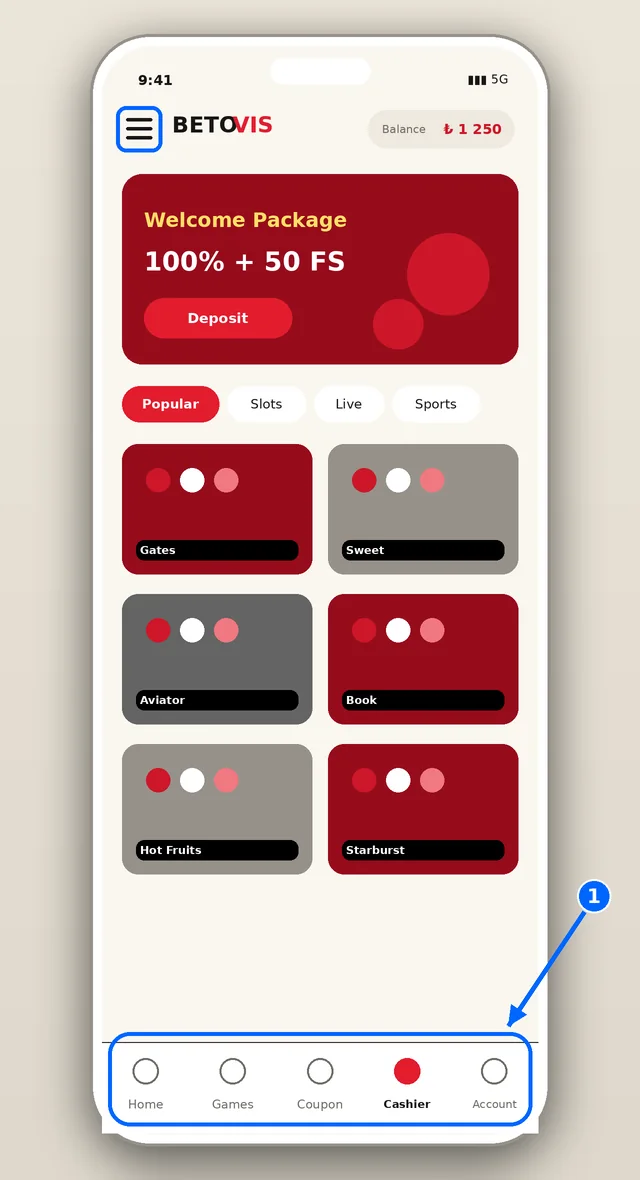
On the phone screen the logo and balance sit at the top with category tabs and game cards below. The pink frame marks the bottom menu, where the cashier and bet slip are the two busiest shortcuts. APK files need extra caution because Android does not vet them like a store does. Fetch the file only from the address confirmed on the verified channel, compare its name and size to the announcement and never install one that came by message, even from a friend. Afterwards switch the unknown-sources permission off, review the permissions requested and delete the file if anything seems odd. An app asking for contacts, messages or camera without a clear reason is a warning sign, whatever its icon looks like.
Tabs scroll sideways. A search field and a provider filter shorten the path to a game in a long list, and a star saves favourites.
An installed APK changes the frame around the site, not what is inside. Most slots offer demo mode on mobile as well. Check the provider and RTP line in the info panel before playing for money; some titles come in several RTP versions. On a small screen the wrong stake is easy to tap, so set the amount before entering the game and use quick-spin features on purpose.
Fast Deposits from Your Phone
The cashier opens from a button in the bottom menu. Pick a method, enter the amount and confirm; bank transfer, cards, e-wallets and crypto appear according to the list in your account. Minimums are usually modest and the welcome package asks a little more for the first deposit. Money normally arrives within minutes, though bank transfers may be slower.
Switch on two-step verification for the cashier: even if a password leaks, a one-time code blocks the way. Never enter a one-time code on a page reached from a message. Most mistakes on phones are typos in the amount or account details, so reread the confirmation screen and never use someone else’s method. Skip public Wi-Fi at the cashier and keep two-step verification enabled.
Betovis Android Installation Steps
Installing on Android takes a few minutes, and the user should remember that no store has reviewed the file. Allow installs from unknown sources temporarily for your browser, download the file, run the installer and turn the permission off again. The steps below suit most phones.
- 01
Verify the current address
Match the domain on the verified channel to the address bar, letter by letter.
- 02
Download the APK
Press only the download button shown on the verified address and compare the file size with the post.
- 03
Allow the install
Inside settings, enable unknown sources for the browser you use, nothing broader.
- 04
Start the installation
Open the file from Downloads and tap Install.
- 05
Switch the permission off
Go back to settings, disable the permission and launch the app.
Menu names vary: some phones say “Install unknown apps”, others hide it under Security. If the app will not start, check free storage, the Android version and the connection. Should trouble continue, delete the file and fetch it again from the verified link. System requirements for the file appear only in the brand’s own announcement.
Betovis on iOS (iPhone) Guide
iPhones cannot run an APK. Their extra route is a PWA shortcut: launch the verified address in Safari, press the Share icon, select Add to Home Screen and name it. The new icon then starts the site in full screen.
- 01
Open Safari
Start in Safari with the verified address; other browsers may hide the option.
- 02
Tap Share
Find the Share icon on the bottom or top edge of Safari.
- 03
Choose Add to Home Screen
Scroll down the menu until the option appears, then confirm the label.
- 04
Open the shortcut
Tap the new icon and the site opens full screen.
Any App Store listing that uses the brand name is unofficial, so skip it. A request to add a profile or trust an enterprise certificate does not belong to any regular installation. When the shortcut stops working, reload the site in Safari, wipe its website data, remove the icon and create it afresh.
Live Betting on Mobile
Live betting opens as a match list with scores and market tabs. The bet slip slides up from the bottom and odds refresh instantly. Android and iPhone behave the same way in the live section and show identical lists. Matches with a stream carry an icon and the video can run full screen; quality falls automatically on a weak connection.
Stability depends on the connection. Switching between Wi-Fi and mobile data can break the page, so after any drop look at the bet history to see whether a slip went through. Battery-saver mode may freeze background pages, another reason to turn it off during live play. The browser and the home-screen shortcut avoid most of these problems because nothing foreign is installed. For readers who bet a few times a week that is the safer default; the APK is a convenience for daily players, not a necessity. Keeping the phone system and browser updated closes more gaps than any single app setting.
Mobile Data and Battery Use
Browsing and slot play use little data, while an hour of live video uses far more. A Betovis download is not needed to watch streams, since the browser handles them, and a Betovis app download stays optional. Lower stream quality cuts consumption, and Wi-Fi suits streaming better. Animated slots on a bright screen drain the battery fast. Whoever still wants a Betovis APK download should take the file solely from the address confirmed on the verified channel.
- Dim the screen and keep auto-lock short.
- Close unused tabs and background apps.
- Charge during long sessions.
- Use lower stream quality to save data.
Long sessions threaten the budget as well as the battery. A screen-time reminder and a fixed stop time are simple tools.
Mobile Troubleshooting
Be it a Betovis iOS shortcut or an Android file, even after a failed APK download, the usual causes are the network, a stale cache or an old address. Common symptoms, probable causes and remedies are paired in the table.
| Symptom | Likely cause | Fix |
|---|---|---|
| Page will not open | Address changed or access restricted | Verify the address on the official channel |
| APK will not install | Permission off or old Android | Enable permission; otherwise use the PWA |
| App freezes | Full storage or cache | Clear cache and restart |
| Stream stutters | Weak connection | Switch to Wi-Fi, lower quality |
| Shortcut will not open | Old address | Delete and add again |
When nothing helps, message live chat with the handset model, the system version and a screenshot of the error. On download questions the operator’s support remains the reliable contact.
FAQ
Is there a Betovis app?
Neither Google Play nor the App Store carries the platform. Choose the mobile browser, a home-screen PWA or, on Android only, an APK from the verified channel; for most people the first two suffice. Reading the details on the relevant page first, and confirming with live chat when needed, is always the safer route.
Where can I download the Betovis APK?
Solely from the link posted on the brand’s verified Telegram channel or official site. Third-party pages can host outdated or dangerous files. The size has to match what was announced, and unknown-sources permission goes back off once installation ends. This is general information; personal situations are decided by the platform's current rules and the support team's reply.
How do I use Betovis on iPhone?
No APK runs on an iPhone. Launch the verified address in Safari, press Share, pick Add to Home Screen and the site starts full screen like an app. A store app carrying the brand name is not official. Gambling is entertainment, and a fixed budget and time limit are the most reliable way to keep it that way.
Are all games available on mobile?
Most slots and live tables open on mobile; a few older titles may be desktop-only. Demo mode, filters and streams exist on phones too. If a game will not load, clear the cache and check the connection. Terms can change over time, so the wording on the official page and in live chat always takes precedence.
The safest phone setup installs nothing: rely on the browser or the PWA shortcut, and treat the APK as a rare exception from a verified source. Recheck the address on the official channel each time, grant minimal permissions and plan session length on a phone as strictly as on a computer.
If play gets out of hand, the responsible gambling page and national helplines can help. The scoring logic is on the method page.
In short, the right address, carefully read terms and limits set in advance are the foundation of a smooth experience. Details can change, so before any important decision it is enough to confirm through the official channels and, when needed, to write to live chat.